
I made this fun little editing showcase! Enjoy!
Music: https://www.audionetwork.com/browse/m/track/after-the-fall_84169
Motion extraction tutorial: https://youtu.be/NSS6yAMZF78?t=226
 OpenStreetMap
I made this fun little editing showcase! Enjoy!
Music: https://www.audionetwork.com/browse/m/track/after-the-fall_84169
Motion extraction tutorial: https://youtu.be/NSS6yAMZF78?t=226
Er is hier nog veel te doen:
Ook in de buurt, laat het me weten
Pierpoint is a small town in South Dakota. It’s now mapped: buildings, sidewalks, footpaths, alleys, power poles. There is probably more micro mapping to do but it’s on the map now.
I’m part of a small volunteer team that runs birding.live, a free site that helps people find birds and green spaces near them. Thought it made sense to introduce how the site leans on OSM data, and to say thanks.
What we do with OSM: geocoding and place search come through Nominatim with an identifying user agent, throttled through our own proxy. Nearby parks, woods and reserves are place queries framed from OSM data, mostly via Geoapify’s OSM-derived layer, and walking trails come from Overpass as named route relations for hiking, foot and walking. Plain paths only ever show up if their OSM tags carry a real signal like difficulty grading or waymarking, so road connectors and farm tracks don’t pretend to be trails.
Who it’s for: the site is a five minute route into birding for beginners. You type a place, see which birds have been reported around it recently from the eBird community, and get a map of parks, reserves and named trails to walk, all credited as OpenStreetMap contributors, ODbL.
Two things we want to improve, honestly: watching how the trail queries behave in areas with patchy tagging, and starting to give corrections back once we’re confident enough to do it properly. If you’ve got pointers on Overpass named-route queries, or you spot one of our pins naming something wrongly, that kind of eye is very welcome.
If you’re curious the site is birding.live and the code is at github.com/chocobar/birding. Thanks for the years of contributor effort behind every pin on our maps.
It occurred to me that some users of OpenStreetMap data cannot read Cyrillic script, so maps lacking name:en variables (or others using Latin letters) may have difficulty reading place names, highway names, and so on. I asked Copilot for help and after a few false starts it produced a PowerShell 7 script that converts Cyrillic script to Latin script.
I downloaded a PBF file for Uzbekistan from Geofabrik, used osmconvert to convert it from PBF to OSM format, then ran the script on it. The OSM file was large (> 3Gb) and the script was done in about 12 minutes. I then used osmconvert to change it back to PBF format and fed it into splitter and mkgmap.
The GMAP folder when viewed in BaseCamp looks perfect, all Cyrillic characters have been changed to Latin characters. My mkgmap style sheets call for name:en in the first instance, if available, then fall back to intl_name, and in the final instance to name. If the name is in Cyrillic it is converted to Latin letters.
I have uploaded the PowerShell 7 script to Github. It should be modifiable for any non-Latin alphabet (next I will experiment with other nearby countries, like Georgia and Armenia).
It occurred to me that some users of OpenStreetMap data cannot read Cyrillic script, so maps lacking name:en variables (or others using Latin letters) may have difficulty reading place names, highway names, and so on. I asked Copilot for help and after a few false starts it produced a PowerShell 7 script that converts Cyrillic script to Latin script.
I downloaded a PBF file for Uzbekistan from Geofabrik, used osmconvert to convert it from PBF to OSM format, then ran the script on it. The OSM file was large (> 3Gb) and the script was done in about 12 minutes. I then used osmconvert to change it back to PBF format and fed it into splitter and mkgmap.
The GMAP folder when viewed in BaseCamp looks perfect, all Cyrillic characters have been changed to Latin characters. My mkgmap style sheets call for name:en in the first instance, if available, then fall back to intl_name, and in the final instance to name. If the name is in Cyrillic it is converted to Latin letters.
I have uploaded the PowerShell 7 script to Github. It should be modifiable for any non-Latin alphabet (next I will experiment with other nearby countries, like Georgia and Armenia).
Usually users add 1500–2000 map notes per day. Yesterday (2026-10-13) one user added 6175 map notes. Yesterday all users added 7717 map notes. So one user added 80% map notes (one user added four times as many notes as all the other users combined).
Over the past months I’ve been building v2 of an idea I’ve had for a while: a way to explore every OpenStreetMap changeset since 2005, see trends over time, and drill down to who did what. (v1 was a prototype built on Datadog; its code is here.
➡️ https://osm-monitor.johan.sh ⬅️ ·
Code: https://github.com/johanmorganti/osm-monitor
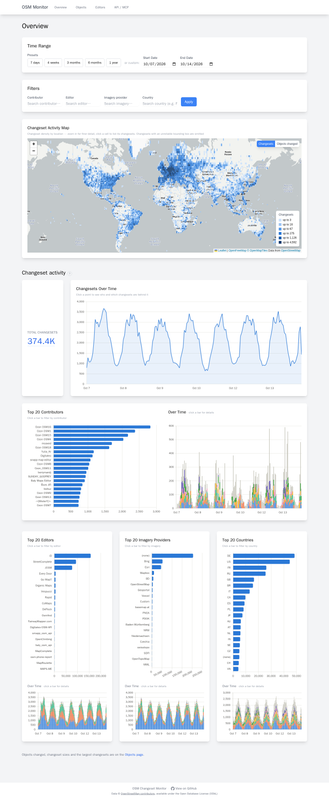
It ingests OSM’s minutely changeset and diff replication from planet.osm.org, plus the full changeset history: 190 million changesets and 19 billion object changes, from 2005 to a few minutes ago.
Everything is public data :)
Everything is aggregated, and everything can be filtered:
I have uploaded updates to Github of my personal scripts and style sheets for making Garmin-compatible IMG files out of OSM-origin PBF files (thank you, Geofabrik!), both for Central Asia (all five countries) and for the Russian Federation.
The Russian Federation style sheets render names of highways and POIs in both English and Russian to ease searching on a GPS unit, wherever a name:en variable is available. Both sets of style sheets render foreign diplomatic missions as well as various other POIs that for whatever reason other providers of IMG files omit.
I found that generating individual IMG files, each with its own family-id=* number in the mkgmap script, then merging them into a single file using GMapTool, allows the Garmin nüvi to list each map individually in MyMaps, which means they can be selected and deselected individually. Since the gmapsupp.img files can be quite large and thus slow to load (and for the nüvi processor to process, especially for older models) this is very handy. The Russia map is well over 2 gigabytes, and the Central Asia map is about 370 megabytes.
My Wintel desktop has 32Gb of RAM and runs on a 12th Gen Intel Core i9-12900K at 3.20 GHz. It processed the Central Asia maps in about 3 minutes start to finish, and the Russian Federation maps in about 20 minutes. In the script I set splitter to use 4Gb of RAM and mkgmap to use 16Gb. If your box has less RAM you will have to adjust those settings and your scripts will run longer.
I asked Copilot to rate nüvi models for compatibility with mkgmap-generated IMG files. This is the table Copilot returned:
I have been building an interactive 3D map of Yas Island, Abu Dhabi: uaemaps.com. It is a free, non-commercial side project.

Every road, building footprint, park and shoreline comes from OpenStreetMap, with building outlines from Overture and Microsoft’s open footprints and greenery from Copernicus Sentinel and ESA WorldCover. On top of that the landmarks are modelled by hand from photos: Ferrari World, Yas Waterworld, the Etihad Arena, the F1 circuit and its tunnels.
The map follows the real sun over Yas, lights up at night by OSM’s lit and use tags, and runs traffic on the real road graph, including bridges and tunnels from OSM’s bridge, tunnel and layer tags. Each place has its own page with opening hours and links.
Working with Yas in OSM showed me a few gaps: some new venues and gates were missing or a few hundred metres off. Where I could check them on the ground, I want to fix them in OSM too.
Feedback from mappers in the UAE is very welcome.
I just updated, as at the beginning of every quarter, the statistics on the wiki here osm.wiki/Stats#Contributor_statistics_reports
(Semi-)Noteworthy is that we passed 2.5 million contributors to the map data in August and that Q3 was an all time high for a quarter. January 2017 was on a monthly base slightly better, but potentially similar to now it was due to one time effects adding up, the initial maps.me inrush and natural disaster mapping in the USA.
But what everybody really wanted to know is how things continued with DeFlock (see this discussion back in July https://en.osm.town/deck/@simon/116931222215984341) and new mapper influx:
| iD | OM/CM | DeFlock | SC | Total | |||||
|---|---|---|---|---|---|---|---|---|---|
| 2026-01 | 9982 | 70,31 % | 1568 | 11,04 % | 1205 | 8,49 % | 613 | 4,32 % | 14198 |
| 2026-02 | 10631 | 72,59 % | 1645 | 11,23 % | 1033 | 7,05 % | 513 | 3,50 % | 14645 |
| 2026-03 | 11863 | 70,22 % | 2365 | 14,00 % | 1038 | 6,14 % | 656 | 3,88 % | 16895 |
| 2026-04 | 11313 | 69,78 % | 2089 | 12,89 % | 1306 | 8,06 % | 534 | 3,29 % | 16212 |
| 2026-05 | 10979 | 67,05 % | 2221 | 13,56 % | 1532 | 9,36 % | 577 | 3,52 % | 16375 |
| 2026-06 | 12236 | 64,83 % | 2384 | 12,63 % | 2584 | 13,69 % | 580 | 3,07 % | 18874 |
| 2026-07 | 12335 | 52,90 % | 3165 | 13,57 % | 4858 | 20,83 % | 1811 | 7,77 % | 23317 |
| 2026-08 | 13487 | 53,01 % | 3410 | 13,40 % | 5364 | 21,08 % | 1908 | 7,50 % | 25441 |
| 2026-09 | 15427 | 63,65 % | 3669 | 15,14 % | 2014 | 8,31 % | 1781 | 7,35 % | 24239 |
お久しぶりです。setowalkerです。
最近忙しく、あまり日記を書けていませんでした。
さて、今回書きたいことは2件です。
・尾張旭市・長久手市のバス停・バス路線のマッピングを進めています。 ・交通マップ(Transport Map)が不調?
尾張旭市・長久手市のバス停・バス路線(名鉄バス・あさぴー号・N-バス)のマッピングをかなり進めました。 まだ把握しきれていない部分(あさぴー号の経路の一部、名鉄バスのトヨタ博物館前~長久手古戦場駅間の経路など)があるので、順次対応していきたいです。
交通マップ(Transport Map)が不調?なのか、10日前に追加したバスルートが反映されていません。早く解決してほしいです。
OpenStreetMap is a beautiful map, but its biggest problem is its user base. If we compare OpenStreetMap with Google Maps, we’ll notice a significant difference in the places, shops, and restaurants that appear on Google Maps but are missing from OpenStreetMap. This isn’t a flaw in OpenStreetMap, but rather a lack of users to add these places. Nevertheless, I try to contribute to the map as much as I can because it’s owned by a free community, not a monopolistic company—and that’s what these communities deserve.
I was looking at my Google Maps and the amount of view I have to date, 47 million! But there is no contact with people , so looked to the Ferdiverse and found this. No not if they have photo uploads, but I can put my Section Eight and Bisset Collection on a map now. Me and Google have issues.
All the buildings in Epworth are mapped and addressed. There are still farms within the bounds of Epworth that can use some attention.
It seems that in fact mkgmap still requires boundary files, even though they are no longer available on the mkgmap website. After puzzling over the problem of the Caspian Sea not rendering correctly for a while I broke down and consulted Copilot, which informed me that they are still needed and to look for them on Thorsten Kukuk’s website. I downloaded sea.zip and bounds.zip, and added the following switches to the mkgmap scripts:
–precomp-sea=sea.zip –bounds=bounds.zip –generate-sea
That seems to have solved the problem.
I have written batch files for the Windows CLI to generate IMG files for Russia and the five Central Asian countries to make updating easier. Other tweaks include setting the maximum nodes per tile in splitter at
–max-nodes=600000
which avoids overloading the Garmin nuvi processor. Maps load faster and navigation no longer involves waiting a long time for the processor to calculate a route.
In the coming days when I have finished debugging and troubleshooting the batch files I will refresh the copies on Github.
1: map marinas ☐
2: finish splitting terraced houses ☐
3: finish mobile home park ☐
☐ not done
✗ done
I am wanting to buy a good handheld GPS that will provide more accurate GPS tracks than my phone. When I look at GPS tracks people have left on trails for example there will be 3-4 completely offset tracks where the trail is totally obscured by canopy so it’s impossible to plot an accurate trail.
I really prefer good open source technology without licensing and all that junk but it seems like GPS inherently requires subscription if you’re looking for accuracy. :’(
So I’m looking into Garmin’s GPSMAPS as a considerable improvement over my phones GPS accuracy. It would also be super interesting to do mapping by hand but I don’t know anything about that!
Also in the future I may be using LIDAR mounted on a drone to get high resolution scans to upload to OSM but I have done no research yet to learn how to. My LIDAR plan is to scan and more accurately map shore lines of lakes and ponds and rivers. We’ll see if that actually happens, yea right right?
OH! And I think it would be helpful to provide up to date street level imagery, I wonder if OSM or one of their partners loan something like that.. Again, yea right.
Loophole! Because it eats constructive time and efforts.
I know Arabic, English and French. I don’t know Berber. So for sure I will have some bias.
Pushing separation ideas on multiple dimensions, now resurfaces as political, religion, linguistic and many other ideologies skirmishes.
Initially, it was only edit-revert loops between Algerian mappers. Now, it noticeable for see some from outside. It is a free community project anyway.
There were multiple discussions over more than a decade: Help community topics
Studies language in Algeria shifted:
Hmm hard moves between generations.
Last one was a Vote on a Proposal by DWG: [Voting] Official tagging consensus for the name tag in Algeria
Proposal documented here: Naming convention
When I joined, most of name are in French. Rest all empty. As long we get more contributors, DWG will deal with a new generation. One pushed for Arabic, a decade ago. Another pushed for Tamazight, these couple years. Expecting English to come next :D.
Well for the agreed proposal:


